Streaming Stick Versus Media Players for Signage
Streaming stick versus media players for digital signage: compare cost, control, reliability, and setup to choose the right hardware for every screen.
On this page
A restaurant manager should not need a technician, a shipping order, and a half-day installation window to change a lunch special. Yet that is still the reality for many businesses using legacy signage hardware. The streaming stick versus media players decision is really a question of how quickly your team can deploy, update, and manage the screens customers see every day.
For many locations, a small streaming stick connected to an existing TV delivers the faster, lower-cost path. A dedicated media player can still be the right call in demanding environments, but it is not automatically the more professional option. The best setup depends on your screens, content, network, and need for centralized control.
Streaming Stick Versus Media Players: The Core Difference
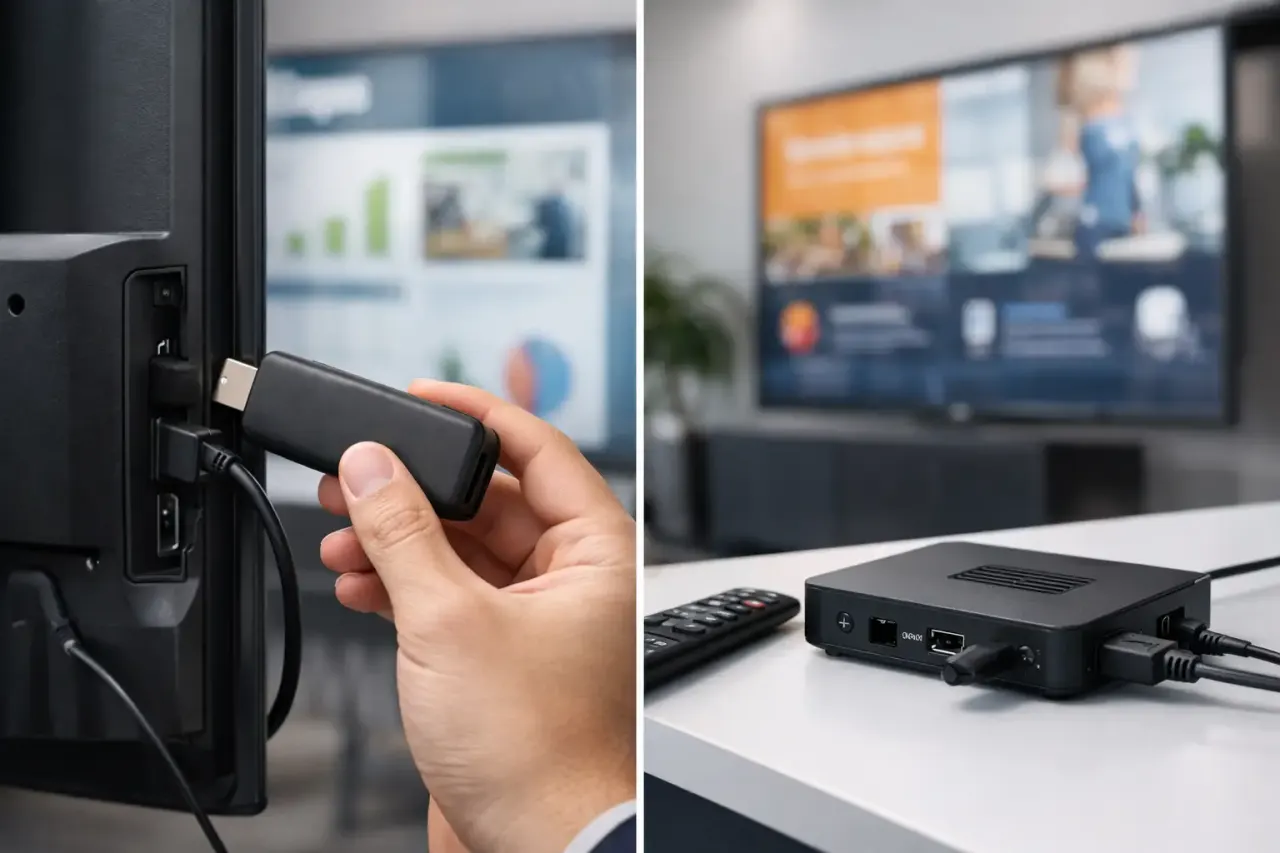
A streaming stick is a compact device that plugs into a TV's HDMI port and connects to Wi-Fi or Ethernet through an adapter, depending on the model. It runs an operating system and apps, making it a familiar and inexpensive way to turn a standard display into a connected screen.
A dedicated digital signage media player is purpose-built hardware installed behind or near a display. It usually runs a specialized operating system and may offer more ports, greater processing power, device-locking options, and support for advanced display configurations.
The key distinction is not simply size. It is the amount of hardware you are buying and managing. A media player adds a separate endpoint to purchase, configure, mount, power, monitor, replace, and secure. A streaming stick keeps the endpoint small and accessible, particularly when paired with cloud-based signage software.
Smart TVs add a third option. If your existing TV supports a compatible signage app, you may not need an external device at all. That can be the most efficient route for office lobbies, retail promotions, menu boards, waiting rooms, and internal communications screens.
Cost Is More Than the Purchase Price
A streaming stick is typically far less expensive than a commercial-grade media player. That difference matters when you are outfitting 10, 50, or 500 displays. But the upfront device price is only the beginning.
Dedicated players can create additional costs for mounting hardware, cabling, power access, spare units, and installation labor. If every screen requires a technician visit, a simple rollout becomes a project with scheduling delays and inconsistent setups across locations.
Streaming sticks reduce that overhead. They are easy to ship, easy to replace, and simple for on-site staff to connect. For a franchise group opening new locations, that can mean a repeatable kit: TV, stick, Wi-Fi connection, and a screen assigned from a central dashboard.
That said, the cheapest device is not always the lowest-cost solution. A low-powered stick may struggle with heavy video, high-resolution motion graphics, or continuous all-day playback if it is not matched to the workload. The practical goal is to avoid paying for more hardware than your signage actually requires.
Setup Speed Favors Simpler Hardware
Traditional media player deployments often involve imaging devices, configuring network rules, attaching hardware to displays, and confirming each player is tied to the correct screen. That process can be appropriate for complex installations, but it slows down routine launches.
A streaming stick is built for a simpler workflow. Plug it in, connect it to the network, install or open the signage application, and register the display. With the right platform, a manager can then assign playlists, schedules, and screen-specific content remotely.
This approach is especially valuable when the person responsible for the screen is not an IT specialist. A gym manager needs to promote a new class. A clinic administrator needs to update check-in instructions. A retail team needs to push a weekend promotion to every store. They need a reliable process, not a hardware manual.
No hardware does not have to mean no standards. Use a consistent device model where possible, label each screen clearly, and document the network used at every location. Those small decisions make remote troubleshooting much easier as your screen count grows.
Centralized Control Matters More Than the Device
The strongest argument for dedicated media players used to be control. Businesses needed a purpose-built box because consumer TVs and USB drives could not provide reliable remote management.
Cloud signage platforms have changed that equation. The control layer now lives in software, not in a bulky device behind every screen. Teams can create content, schedule it by daypart, deploy it to selected locations, and confirm whether a display is online from one dashboard.
That is where a streaming stick becomes more than a budget choice. It becomes a practical endpoint for a centrally managed system. The hardware plays the content, while the platform handles the work that operations teams actually care about: who sees what, when it changes, and whether the screen is still running.
For example, a multi-location restaurant can schedule breakfast menus in the morning, lunch promotions at midday, and local event messaging in the evening. A media player can do this too, but it does not make the workflow better by itself. The software and management model do.
VitVue is designed around this simpler model, helping businesses use compatible Smart TVs or inexpensive streaming-stick-connected displays while managing content, schedules, playback, and screen status in one place.
Reliability Depends on Your Environment
Dedicated media players have an advantage in certain conditions. They can be better suited to large video walls, unusual display resolutions, interactive kiosks, touch applications, very high-bitrate content, and installations where wired networking is mandatory. Some models are also built for industrial temperatures or 24/7 workloads.
For standard digital signage, however, reliability is usually less about a large hardware box and more about disciplined deployment. A quality TV, stable internet connection, properly configured power settings, and offline playback capability will prevent most avoidable interruptions.
Offline playback is particularly important. If a location temporarily loses internet access, the display should continue showing its last downloaded schedule rather than going blank. This is a platform capability to verify regardless of whether you choose a stick, a Smart TV app, or a media player.
Network conditions matter as well. A stick on weak guest Wi-Fi may produce an inconsistent experience. In that case, improve signal coverage, use a managed business network, or select a device configuration that supports wired Ethernet. Do not blame the device for a network problem that would affect any connected player.
When a Dedicated Media Player Is Worth It
A dedicated player is a sensible investment when your requirements exceed the limits of a simple screen endpoint. This may include multi-display synchronization, complex video walls, intensive 4K motion content, custom peripheral connections, or strict corporate security controls.
It can also be the right option when a business has a standardized hardware policy and an internal IT team already equipped to manage devices at scale. In that environment, the added hardware may fit an established process.
The mistake is treating these edge cases as the default for every digital sign. A single-screen menu board does not need the same architecture as a command center video wall. A hotel lobby welcome display does not need the same hardware profile as an interactive airport kiosk.
Choose dedicated players because your use case requires them, not because they are the traditional answer.
A Practical Decision Framework
Start with the display you already own. If it is a compatible Smart TV, test the native app route first. If it is a standard TV with available HDMI input, a streaming stick is often the fastest way to get live.
Then consider the content. Static promotions, menus, announcements, dashboards, and standard video loops are well suited to sticks and Smart TV apps. More demanding visual systems may justify a dedicated player.
Finally, look at operations. If your priority is fast deployment across multiple locations, lower hardware spend, and remote updates without IT involvement, keep the endpoint simple. If your priority is specialized hardware capability, budget for the device and the ongoing support it requires.
The right signage setup should make your next update feel routine. Use the hardware that gets screens live quickly, keeps them visible from one dashboard, and leaves your team focused on the customer message instead of the box behind the TV.