Digital Signage Software: 9 Things to Check Before You Choose
Choosing digital signage software can look simple at first.
On this page
You need a screen, some content, and a way to publish it. But once you start managing content regularly, adding more screens, or operating displays across several locations, the differences between platforms become much more important.
The right software should make your screens easier to manage, not create another technical system that requires constant attention. It should help you create content, publish updates, organize screens, schedule messages, and keep everything running from one central place.
Before choosing a platform, it is worth looking beyond the basic feature list. Here are nine important things to check when evaluating digital signage software for your business.
1. How Easy Is the Software to Use?
A digital signage platform should not require technical knowledge for everyday tasks.
Think about who will actually use the system. It might be a restaurant manager updating a menu, a retail employee changing a promotion, a hotel team publishing guest information, or an office manager updating internal announcements.
The dashboard should make common actions simple. Creating a slide, uploading media, changing a schedule, and publishing new content should all be straightforward.
A complicated platform may offer hundreds of features, but those features have little value if your team avoids using them because the system is difficult to understand.
Look for software with a clear dashboard, visual content editing, reusable templates, and an easy publishing process.
2. Can You Manage Every Screen Remotely?
One of the biggest advantages of modern digital signage software is centralized management.
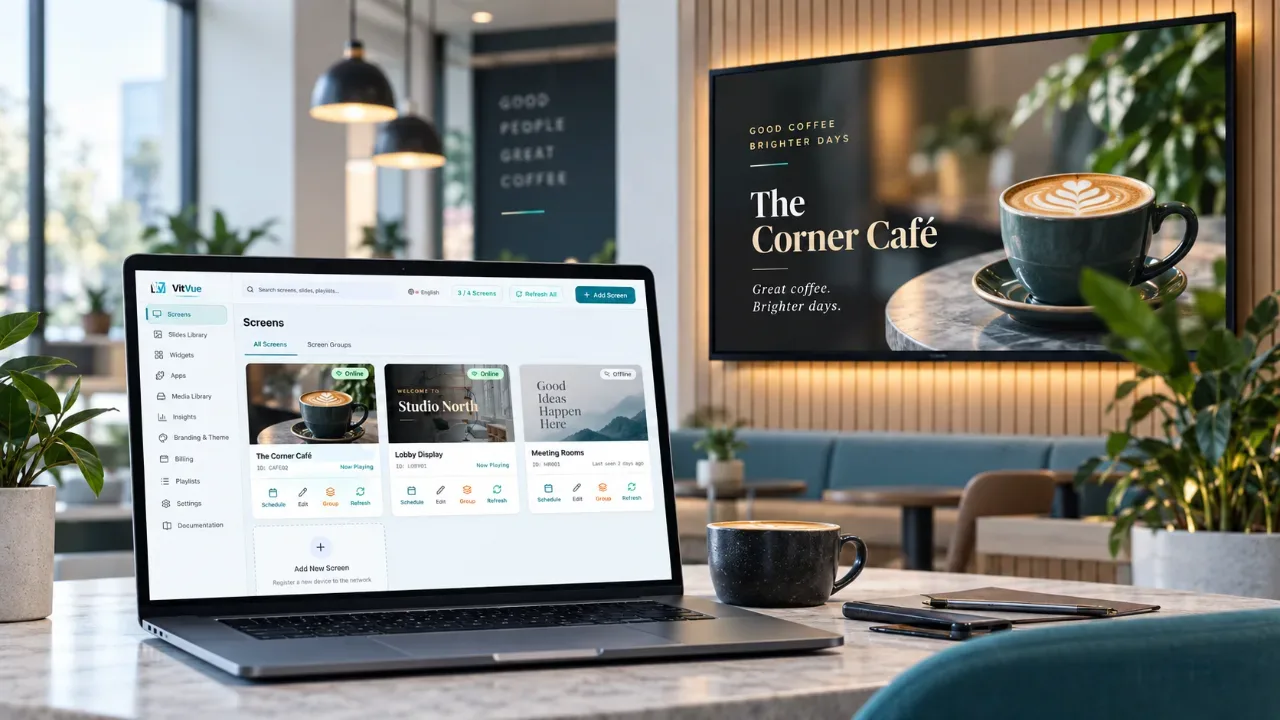
Instead of visiting each screen physically, you should be able to manage displays from a web dashboard. This becomes especially important when a business operates multiple screens or locations.
With VitVue digital signage, businesses can manage connected screens from one dashboard and publish changes remotely.
Remote management allows teams to update promotions, announcements, menus, schedules, and other content without carrying USB drives between screens.
For businesses with multiple branches, centralized management can also help maintain consistent branding while still allowing different content to appear at different locations.
3. What Hardware Does It Require?
Software is only one part of a digital signage setup. You also need to consider what must be connected to each screen.
Some systems require dedicated media players for every display. That can increase the initial cost of deployment and add another device that needs to be installed and maintained.
Other platforms can work directly with compatible Smart TVs, web browsers, or inexpensive streaming devices.
VitVue, for example, is designed to work with Smart TVs including Android TV and Google TV, while browser based playback can support additional screens. A standard television can also be used with a compatible streaming stick.
Before choosing your digital signage software, calculate the complete setup cost rather than looking only at the monthly software price.
If you already own suitable screens, a platform that can use your existing hardware may make deployment considerably simpler.
4. Does It Include Content Creation Tools?
Publishing content is easier when you can create it inside the same platform.
A useful digital signage system should allow you to combine text, images, videos, layouts, and other visual elements without constantly switching between different design applications.
Ready made templates can also save time.
VitVue provides a collection of digital signage templates for different industries and purposes. Businesses can start with an existing layout and customize it rather than designing every screen from scratch.
This can be especially useful for smaller teams that do not have a dedicated designer available whenever a promotion or announcement needs to change.
5. Can Content Be Scheduled?
Not every message should appear all day.
A restaurant may want breakfast content in the morning and dinner promotions later in the day. A gym might promote morning classes before work and evening sessions in the afternoon. A retail store could schedule weekend promotions to appear automatically.
Good digital signage software should allow you to prepare content in advance and determine when it appears.
Scheduling reduces the amount of manual work required and makes signage more relevant to the people viewing it.
When comparing platforms, check whether you can schedule content according to time, day, playlist, screen, or location.
6. What Happens When the Internet Connection Drops?
Digital signage should not immediately become a blank screen because of a temporary network problem.
This is why offline playback is an important feature to consider.
When content is cached locally on the device, previously downloaded media can continue playing even when the internet connection is temporarily unavailable. Once connectivity returns, the screen can reconnect and receive new updates.
VitVue includes offline playback for supported content, helping displays continue showing downloaded content during temporary connectivity interruptions.
This is particularly valuable for businesses where screens are expected to remain active throughout the day.
7. Can You Manage Multiple Screens and Locations?
Your requirements may change as your business grows.
You may begin with a single screen at reception and later add screens in other rooms, stores, branches, or buildings.
Your digital signage software should make that expansion manageable.
Features such as screen groups allow businesses to organize displays according to their purpose or location. Instead of updating every screen separately, administrators can publish content to groups of screens.
For example, a retail chain could have one playlist for all stores and another promotion that appears only in selected locations.
You can explore different applications across retail, hospitality, restaurants, education, healthcare, offices, and other sectors on the VitVue industries page.
8. Can You See Whether Screens Are Online?
Publishing content is only part of managing a digital signage network.
You also need to know whether your screens are actually connected and operating correctly.
Screen monitoring becomes increasingly important as the number of displays grows. If you manage twenty screens across several locations, you cannot depend on employees manually reporting every disconnected display.
A centralized dashboard should provide visibility into screen status so administrators can identify issues more quickly.
This turns digital signage software into more than a publishing tool. It becomes the control center for the entire screen network.
9. Does the Pricing Fit the Way You Plan to Grow?
The cheapest platform is not automatically the most cost effective one.
When comparing pricing, consider the complete system.
Ask how many screens are included, how storage limits work, whether additional hardware is necessary, what happens when you add more displays, and which features are included at each level.
You should also consider the operational cost of managing the system.
Software that saves employees from visiting screens manually or relying on separate media players may reduce costs beyond the subscription itself.
VitVue offers plans designed around different screen counts, starting with a trial that lets businesses test the platform before committing to a larger deployment. You can review the current options on the digital signage pricing page.
Choosing Digital Signage Software for Your Business
The best digital signage software is not necessarily the platform with the longest feature list. It is the platform that makes everyday screen management easier.
Before making a decision, think about how your business will actually use the system.
Can your team create content without technical help? Can you update screens remotely? Can existing TVs be used? Can content be scheduled? Will screens continue playing during connectivity problems? Can the platform grow with you?
These practical questions are often more important than advanced features that may never be used.
For businesses that want a straightforward way to create, schedule, publish, and manage content across connected screens, VitVue provides a cloud based platform designed to keep the process simple.
You can start with one screen, test the full workflow, and expand your digital signage network as your needs grow.